
Dockable panels
NemaStudio has a modern and flexible user interface with docking and floating panels, allowing to set up the interface to your own preferences.
There is an object selector panel with large buttons for fast opening of objects, an explorer tree panel showing the objects currently in the database, a monitor panel for monitoring all I/O activity and a control center panel with up/down and slider controls for easy handling of the dynamic values to be passed to the active objects.
Panels can be closed, hidden and made floating.
All dockable panels have a heading in common that looks as follows: 
 Close the panel: Will close the panel. Can be reopened via the View menu.
 Autohides the panel: Will hide the panel to the edge of the main window. A small tab will remain visible. Hoovering over it will pop up the panel again. Re-clicking the thumb nail will dock the panel again in its original position. This can be handy if you want the panel temporarily out of view.
 Opens the following context menu: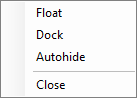
Float: Will make the panel float on top of the main window and the other panels. Double clicking on the header bar of the floating panel will re-dock the panel.
Dock: Will dock the panel
Autohide: see above at
Close: see above at