
Professional GPS simulator

Focused GPS simulation without a physical receiver

GPSSimul generates dynamic GPS NMEA 0183 sentences through a selected Windows serial port, giving developers and demonstrators dependable GPS input in the office.

  • Generate GGA, GSA, GLL, RMC, VTG and ZDA GPS sentences.
  • Change course, speed and altitude while the simulator is running.
  • Test mapping software, autopilots, chart plotters and other NMEA-compatible devices.
  • Log generated sentences for later reference.

Core capabilities

Built for practical marine testing workflows

GPS-specific workflow

A straightforward option when you need realistic GPS output without AIS or additional instrument simulation.

Dynamic navigation

Alter course, speed and altitude during a run and observe the resulting GPS sentence stream.

Office-based testing

Develop and validate GPS-aware software without connecting a physical GPS receiver or waiting for a signal.

Serial integration

Output through an available COM port and connect using physical or virtual serial-port pairs.
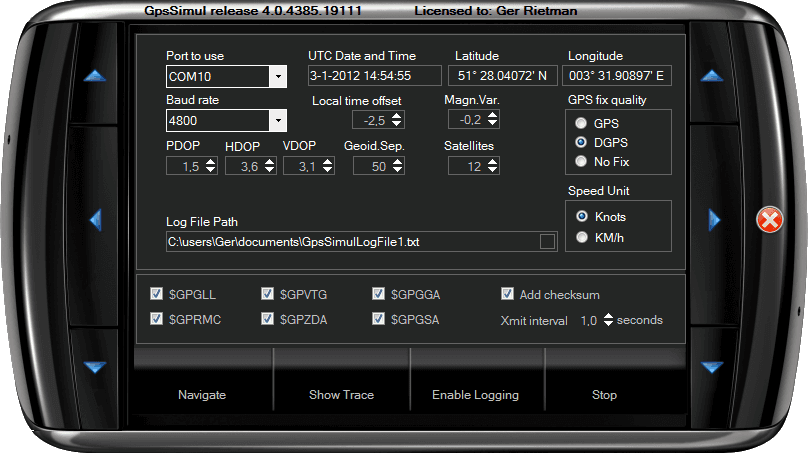
GPSSimul setup mode with configurable GPS position and output settings

Inside the product

Configure a GPS stream for your exact test case

Use GPSSimul when focused GPS data is sufficient. For AIS targets, other instruments, Ethernet output or multiple parallel sources, move up to NemaStudio.

Supported sentences

  • GGA — fix and altitude
  • GSA — dilution and active satellites
  • GLL — geographic position
  • RMC — recommended minimum data
  • VTG — course and speed
  • ZDA — date and time

Dynamic controls

  • Course
  • Speed
  • Altitude
  • Transmit interval
  • Optional checksum
  • GPS fix quality (default DGPS)

Best suited to

  • GPS application development
  • Mapping-software tests
  • Chart plotter demonstrations
  • Autopilot input tests
  • Situations without a live GPS signal

Setup details

Configure the GPS data and serial connection

GPSSimul exposes the navigation, accuracy and output settings documented for the tested application.

GPS simulation settings

Position
Set latitude and longitude while the simulation is stopped.
Movement
Set course, speed and altitude, then adjust them while output is running.
Accuracy
Configure dilution of precision values, geoidal separation and the number of satellites in view.
Time
Use the current UTC date and time with a configurable offset for local time.
Variation
Set magnetic variation for RMC; negative values are westerly and positive values are easterly.
Fix and units
Select GPS fix quality for GGA and choose the preferred speed unit.

Serial and sentence output

Connections
Use physical or virtual serial ports, or a USB-to-serial converter for external equipment.
Baud rate
Select from 1,200 through 256,000 baud; the default is 4,800 baud.
Port format
8 data bits, no parity, 1 stop bit and no RTS/CTS handshaking.
Selection
Choose which supported NMEA 0183 sentences are included in the output.
Interval
Set the transmit interval; all selected sentences are sent within each interval and the documented standard setting is 1 second.
Output options
Optionally calculate and append checksums, display a live trace and write generated sentences to a selected log-file location.

During a simulation

Navigate, observe and resume your test

The simulated position is recalculated at every transmit interval using the current course and speed, producing a moving GPS data stream without a live receiver.
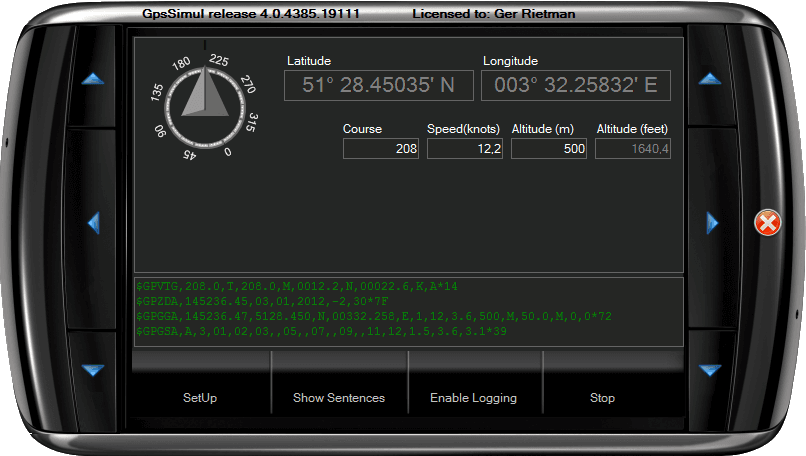
  • Adjust course, speed and altitude while the simulation is running.
  • See the current simulated course, position, speed and altitude in the Navigate panel.
  • Switch between Setup and Navigate panels, and between sentence selection and the output trace.
  • Pause output to select, copy or clear generated sentences in the trace.
  • Automatically restore saved settings and the current state when GPSSimul starts again.
GPSSimul Navigate panel showing simulated course, position, speed and altitude

Start evaluating

Test GPSSimul in your own environment

The evaluation build is fully functional apart from its sentence limit. Purchase once when you are ready to remove that limit.