
NMEA, AIS & Radar simulator

Professional NMEA, AIS and Radar simulation in one environment

NemaStudio is a Windows application for simulating valid NMEA 0183 and IEC 61162 output from nautical instruments, sensors and target objects.

  • Run multiple nautical instrument and sensor simulations together with multiple AIS targets across 5 AIS target types.
  • Produce custom formatted sentences alongside the built-in instruments and targets.
  • Match multiple instruments, targets and ports over the same or different ports simultaneously.
  • Transmit through configurable serial ports and Ethernet UDP multicast or monocast connections.
  • Create realistic navigation sensor and traffic scenarios for ECDIS training and simulation.

Core capabilities

Built for practical marine testing workflows

Instruments and targets

Simulate GPS, Weather, Heading, Radar, Sounder, Velocity, Transducer, Attitude, custom sentences, Bridge Alert Management and 5 AIS target types.

Serial and Ethernet output

Send valid NMEA 0183 sentences through configurable PC serial ports and Ethernet UDP multicast or monocast connections.

Control center

Control dynamic parameters common to all objects—including altitude, course, velocity and rudder—from one panel.

Saved state

Optionally save the settings and current state of all objects on exit, then continue where you left off after restarting.
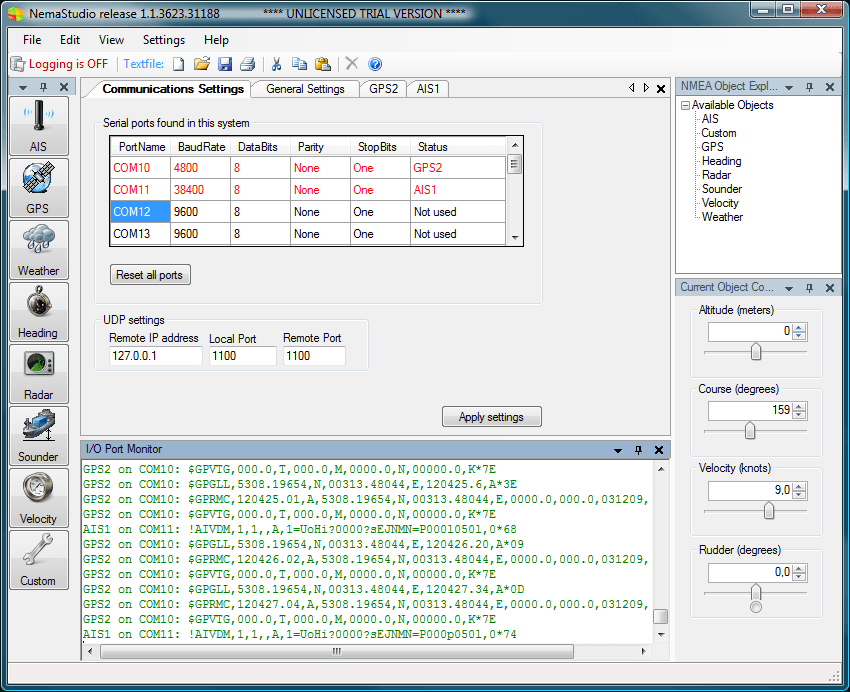
NemaStudio communications settings showing configurable serial and network ports

Inside the product

Match instruments, targets and ports to your test setup

All instruments, targets and communications ports can be matched and mixed. Multiple instances of several objects can transmit over the same port or over different ports simultaneously.

Simultaneous output

  • Multiple instrument and sensor simulations
  • Multiple AIS targets across 5 AIS target types
  • Custom formatted sentences

Communications

  • User-configurable PC serial ports
  • Ethernet UDP multicast
  • Ethernet UDP monocast
  • Same or different ports simultaneously

Supported standards

  • NMEA 0183 version 2.20
  • NMEA 0183 versions 2.30, 3.01 and 4.0
  • IEC 61162
  • NMEA 2000 through a suitable gateway

Simulation coverage

Built-in NMEA instruments, sensors and AIS messages

Combine the instrument data and AIS target types your equipment, application or training scenario needs in one coordinated simulation.

NMEA 0183 instruments and sensors

GPS
GLL, RMC, VTG, ZDA, GGA, GSA, GSV, XTE, RMB, DTM
Weather
MWD, MWV, VWR, VWT, MTW
Heading
HDG, HDT, HDM, THS, ROT, RSA
Radar
TLL, TTM, OSD
Sounder
DBT, DPT, DBK, DBS
Velocity
VHW, VLW, VBW
Transducer
XDR
Attitude
Pitch, Roll, Heave
Custom
Your own proprietary sentences
Bridge
Bridge Alert Management

Dynamically simulated AIS messages

Class A vessels
Messages 1 and 5
Class B vessels
Messages 14, 18, 19 and 24
Base stations
Message 4
SAR aircraft
Message 9
Aids to Navigation
Message 21
Simultaneous capacity

Run multiple nautical instrument and sensor simulations together with multiple AIS targets across 5 AIS target types, plus custom formatted sentences.
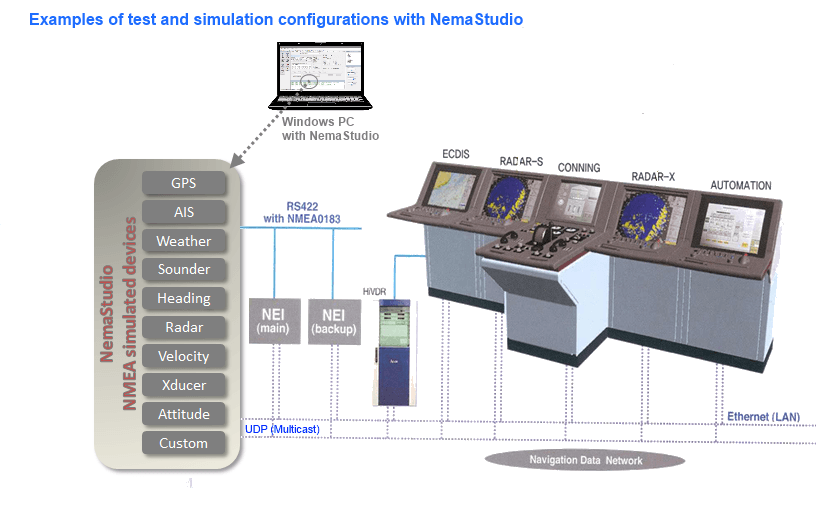
Test configuration showing NemaStudio replacing nautical sensors and sending simulated data to navigation equipment

Testing configuration

Test NMEA and IEC 61162 equipment in your own environment

Generated data can be picked up and processed by navigation equipment supporting the NMEA/IEC 61162 protocol, reducing the need for field testing and physical instruments. This makes NemaStudio particularly suitable for ECDIS training and simulation.

  • Use virtual instruments with configurable dynamic settings.
  • Demonstrate products without installing and calibrating real NMEA instruments.
  • Connect NMEA 2000 networks through a suitable gateway such as the Actisense NGX-1.
  • The gateway translates generated NMEA 0183 sentences to valid NMEA 2000 PGNs.

Mix and match

Use multiple instances of instruments, sensors and targets over the same or different ports simultaneously.

Dynamic control

Common dynamic parameters are collected in the control center. More static parameters are configured under a separate tab.

Save current state

Optionally save all object settings and current state when exiting, then continue where you left off after restarting.

Flexible interface

Resize, hide and reposition panels, and use the embedded text editor to edit NMEA data without leaving NemaStudio.

Start evaluating

Test NemaStudio in your own environment

The evaluation build is fully functional apart from its sentence limit. Purchase once when you are ready to remove that limit.