
Tool bar
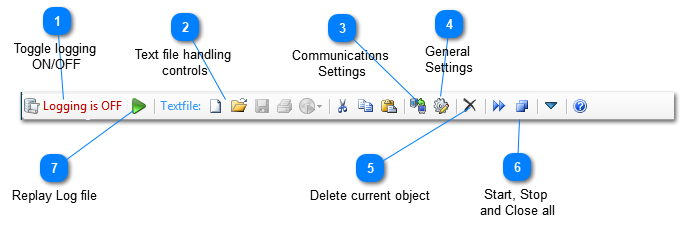
 Toggle logging
ON/OFF 
Toggle switch for the logging function. Click to toggle on or off.
When switched on, all I/O will be written to a predefined logfile. You set the path and file name for the logfile in the general settings, and also the parameters that have to be written together with the NMEA data.
|


 Communications
Settings 
Opens the Communications Settings tab
|
 General
Settings 
Opens the General Settings tab
|




 Replay Log file
Clicking this button will initiate the replay of a stored NemaStudio log file.
This will replay a previously saved log file provided that the following settings are true (General Settings/Program settings):

so that NemaStudio is able to replay including the original time intervals, objects and ports.
Note that replying a log file will close all active objects and that logging must be "OFF".
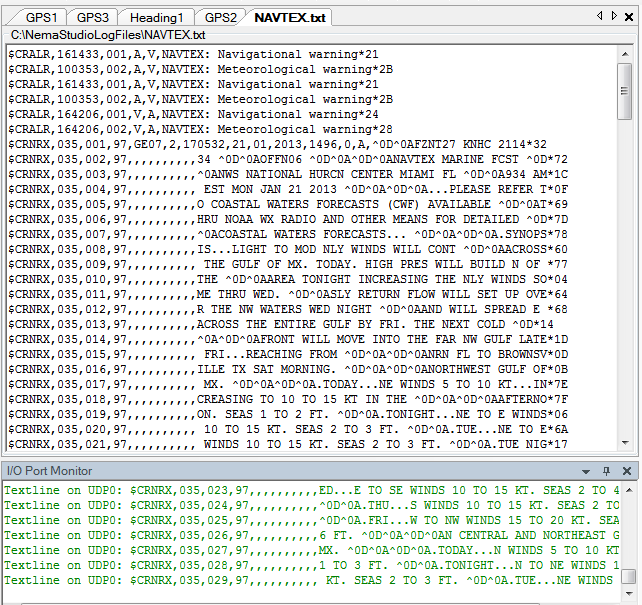
Below is an example of a properly formatted log file, observe the date/time, object id and port in the beginning of each sentence:
 |