

NemaStudio
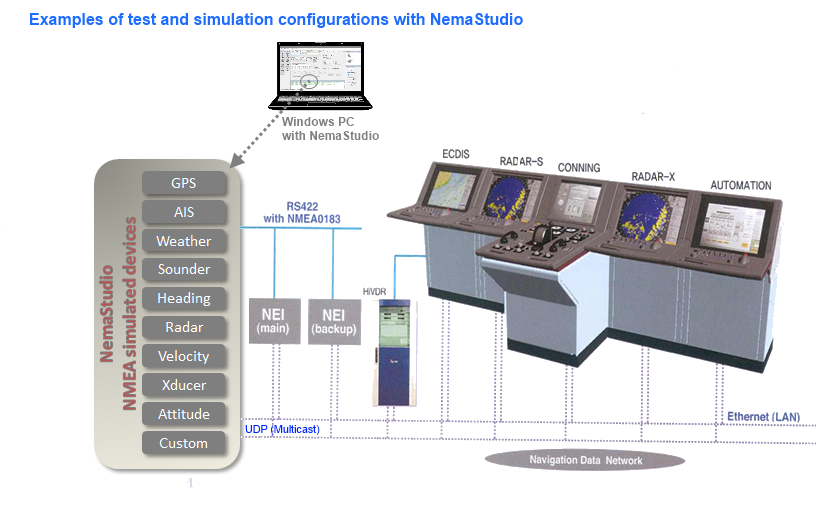
NemaStudio provides the professional developer of NMEA products with a very powerful development and testing tool by simulating the output of various nautical instruments and target objects including GPS, AIS and Radar. All instruments, targets and ports can be matched and mixed, meaning you can have multiple instances of several objects transmitting over the same or over different ports simultaneously. This makes this navigation sensors simulation software program also very suitable for e.g. ECDIS training and simulations.
See the following examples:
Benefits
The core function of the program is to send valid NMEA
0183 sentences out via user configurable PC serial
communications ports and/or Ethernet UDP connections. Both
UDP Multicast and Monocast are supported. The data can be picked up and
processed by various navigation equipment supporting the
NMEA/IEC61162 protocol. This allows very comfortable testing of your
NMEA products in your own environment so that the need for
field testing will decrease dramatically.
Virtual instruments with
configurable dynamic settings give you full control over
your test parameters.
Using NemaStudio will also let you conveniently demonstrate
your products in your own
showroom or at fairs and other events without the hassle of
installing, connecting and calibrating real NMEA
instruments.
NemaStudio will also save you a
lot of money because you don't need to purchase 'real' NMEA/IEC61162
devices anymore to test your NMEA 0183/IEC61162 compatible products.
Instruments, sensors and targets
Currently the program can simulate the output of up to 6 different nautical instruments/sensors and 5 different AIS targets simultaneously, plus an option to produce custom formatted sentences.
AIS messages of the following classes can be dynamically simulated:
- Class A vessels (message 1 and 5);
- Class B vessels (message 14, 18, 19 and 24);
- Base stations (message 4);
- SAR aircrafts (message 9) and
- Aids to Navigation (message 21).
NMEA0183 instruments and sensors that you can have NemaStudio to simulate:
- GPS (GLL, RMC,
VTG, ZDA, GGA,
GSA, GSV, XTE, RMB,
DTM);
-
Weather (MWD, MWV, VWR, VWT, MTW);
-
Heading (HDG, HDT, HDM, THS, ROT, RSA);
-
Radar (TLL, TTM, OSD);
-
Sounder (DBT, DPT, DBK, DBS);
- Velocity (VHW, VLW, VBW);
-
Transducer (XDR);
-
Attitude (Pitch, Roll, Heave);
-
Custom (your own proprietary sentences);
-
Bridge Alert Management.
Mix and match
Instruments, sensors, targets and ports can be matched and mixed, meaning you can have multiple instances of several objects transmitting over the same or over different ports simultaneously.
Dynamic control
Dynamic parameters that are common to all objects (altitude, course velocity and rudder) are collected in one panel called "the control center". Common parameters that are more static of nature are configurable under a separate tab.
Saves state
The settings and the "current state" of all objects can be optionally saved upon exiting, so when restarting the program you can continue where you left off.
Flexible GUI
The graphical user interface (GUI) is very flexible, with resizable panels that can be hidden and repositioned at will. NemaStudio includes an embedded text editor for easy editing NMEA data without the need to leave the program when text editing is required.
NMEA versions
NemaStudio supports both NMEA 0183 version 2.20 and 2.30/3.01/4.0 and IEC 61162. NMEA 2000 networks can be physically connected via a suitable gateway (e.g. the NGW-1 from Actisense). This gateway will also translate the NemaStudio generated NMEA 0183 sentences to valid NMEA 2000 PGN's.
Check out the user manual
Check out the user guide as pdf file or the user guide in html format for all details on NemaStudio.
Download a fully functional trial version by clicking the button below:

To obtain a license to lift the 500-sentence limitation of the trial version, click the button below.
